SSL (and its successor,
TLS)
is a protocol that operates directly on top of TCP (although there are
also implementations for datagram based protocols such as UDP). This
way, protocols on higher layers (such as HTTP) can be left unchanged
while still providing a secure connection. Underneath the SSL layer,
HTTP is identical to HTTPS.
When using SSL/TLS correctly, all an attacker can see on the cable is
which IP and port you are connected to, roughly how much data you are
sending, and what encryption and compression is used. He can also
terminate the connection, but both sides will know that the connection
has been interrupted by a third party.
In typical use, the attacker will also be able to figure out which
host name you're connecting to (but not the rest of the URL): although
HTTPS itself does not expose the host name, your browser will usually
need to make a DNS request first to find out what IP address to send the
request to.
High-level description of the protocol
After building a TCP connection, the SSL handshake is started by the
client. The client (which can be a browser as well as any other program
such as Windows Update or PuTTY) sends a number of specifications: which
version of SSL/TLS it is running, what ciphersuites it wants to use,
and what compression methods it wants to use. The server checks what the
highest SSL/TLS version is that is supported by them both, picks a
ciphersuite from one of the client's options (if it supports one), and
optionally picks a compression method.
After this the basic setup is done, the server sends its certificate.
This certificate must be trusted by either the client itself or a party
that the client trusts. For example if the client trusts GeoTrust, then
the client can trust the certificate from Google.com, because GeoTrust
cryptographically signed Google's certificate.
Having verified the certificate and being certain this server really
is who he claims to be (and not a man in the middle), a key is
exchanged. This can be a public key, a "PreMasterSecret" or simply
nothing, depending on the chosen ciphersuite. Both the server and the
client can now compute the key for the
symmetric encryption whynot PKE?.
The client tells the server that from now on, all communication will be
encrypted, and sends an encrypted and authenticated message to the
server.
The server verifies that the MAC (used for authentication) is
correct, and that the message can be correctly decrypted. It then
returns a message, which the client verifies as well.
The handshake is now finished, and the two hosts can communicate securely. For more info, see
technet.microsoft.com/en-us/library/cc785811 and
en.wikipedia.org/wiki/Secure_Sockets_Layer.
To close the connection, a close_notify 'alert' is used. If an
attacker tries to terminate the connection by finishing the TCP
connection (injecting a FIN packet), both sides will know the connection
was improperly terminated. The connection cannot be compromised by this
though, merely interrupted.
Some more details
Why can you trust Google.com by trusting GeoTrust?
A website wants to communicate with you securely. In order to prove
its identity and make sure that it is not an attacker, you must have the
server's
public key.
However, you can hardly store all keys from all websites on earth, the
database would be huge and updates would have to run every hour!
The solution to this are Certificate Authorities, or CA for short.
When you installed your operating system or browser, a list of trusted
CAs probably came with it. This list can be modified at will; you can
remove whom you don't trust, add others, or even make your own CA
(though you will be the only one trusting this CA, so it's not much use
for public website). In this CA list, the CA's public key is also
stored.
When Google's server sends you its certificate, it also mentions it
is signed by GeoTrust. If you trust GeoTrust, you can verify (using
GeoTrust's public key) that GeoTrust really did sign the server's
certificate. To sign a certificate yourself, you need the private key,
which is only known to GeoTrust. This way an attacker cannot sign a
certificate himself and incorrectly claim to be Google.com. When the
certificate has been modified by even one bit, the sign will be
incorrect and the client will reject it.
So if I know the public key, the server can prove its identity?
Yes. Typically, the public key encrypts and the private key decrypts.
Encrypt a message with the server's public key, send it, and if the
server can tell you what it originally said, it just proved that it got
the private key without revealing the key.
This is why it is so important to be able to trust the public key:
anyone can generate a private/public key pair, also an attacker. You
don't want to end up using the public key of an attacker!
If one of the CAs that you trust is compromised, an attacker can use
the stolen private key to sign a certificate for any website they like.
When the attacker can send a forged certificate to your client, signed
by himself with the private key from a CA that you trust, your client
doesn't know that the public key is a forged one, signed with a stolen
private key.
But a CA can make me trust any server they want!
Yes, and that is where the trust comes in. You have to trust the CA
not to make certificates as they please. When organisations like
Microsoft, Apple and Mozilla trust a CA though, the CA must have audits;
another organisation checks on them periodically to make sure
everything is still running according to the rules.
Issuing a certificate is done if, and only if, the registrant can prove they own the domain that the certificate is issued for.
What is this MAC for message authentication?
Every message is signed with a so-called
Message Authentication Code,
or MAC for short. If we agree on a key and hashing cipher, you can
verify that my message comes from me, and I can verify that your message
comes from you.
For example with the key "correct horse battery staple" and the
message "example", I can compute the MAC "58393". When I send this
message with the MAC to you (you already know the key), you can perform
the same computation and match up the computed MAC with the MAC that I
sent.
An attacker can modify the message, but does not know the key. He
cannot compute the correct MAC, and you will know the message is not
authentic.
By including a sequence number when computing the MAC, you can eliminate
replay attacks.
SSL does this.
You said the client sends a key, which is then used to setup symmetric encryption. What prevents an attacker from using it?
The server's public key does. Since we have verified that the public
key really belongs to the server and no one else, we can encrypt the key
using the public key. When the server receives this, he can decrypt it
with the private key. When anyone else receives it, they cannot decrypt
it.
This is also why key size matters: The larger the public and private
key, the harder it is to crack the key that the client sends to the
server.
How to crack SSL
In summary:
- Try if the user ignores certificate warnings;
- The application may load data from an unencrypted channel (e.g. http), which can be tampered with;
- An unprotected login page that submits to HTTPS may be modified so that it submits to HTTP;
- Unpatched applications may be vulnerable for exploits like BEAST and CRIME;
- Resort to other methods such as a physical attack;
- Exploit side channels like message length and the time taken to form the message;
- Wait for quantum attacks.
See also:
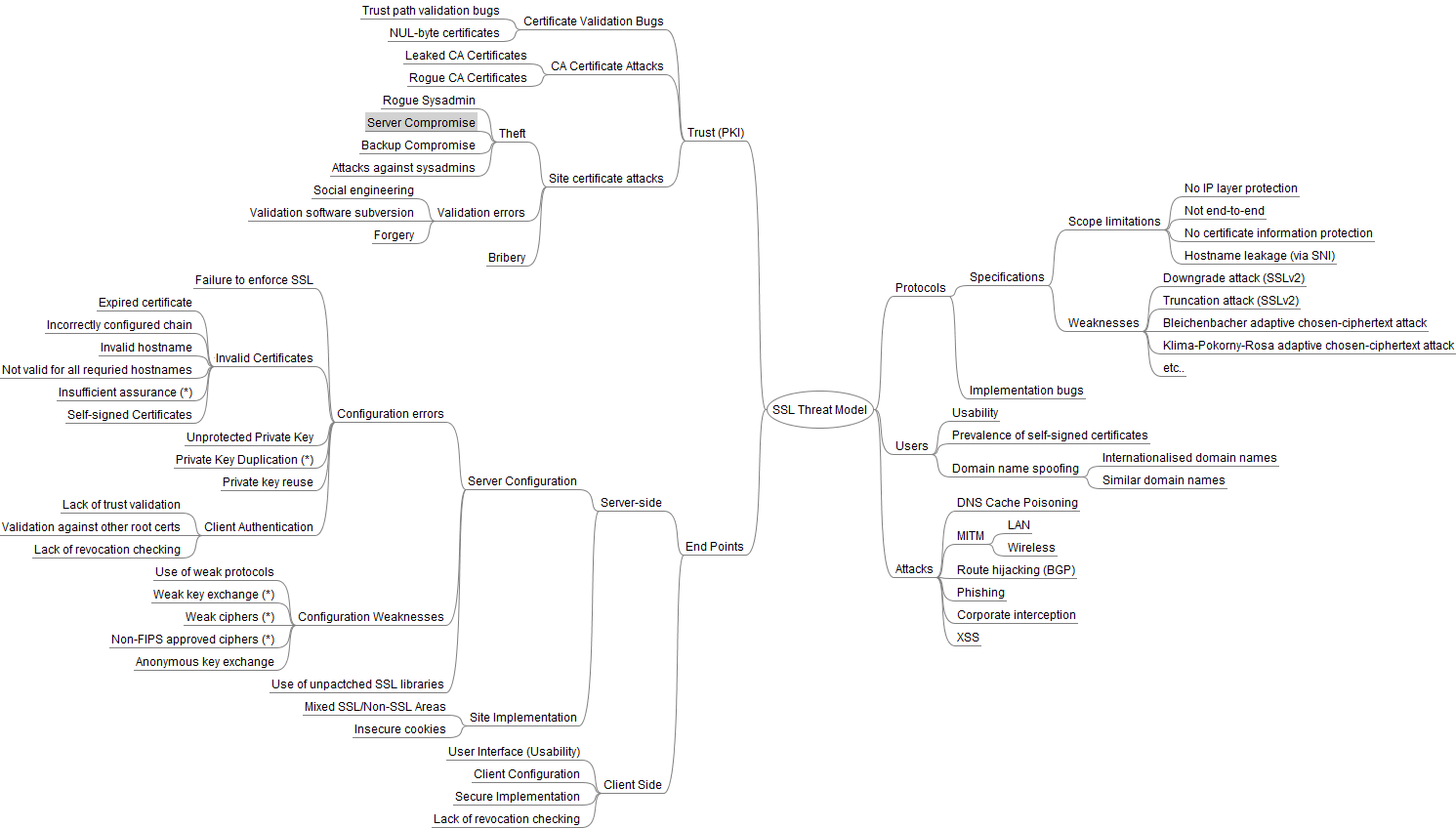
A scheme with many attack vectors against SSL by Ivan Ristic (png)
In detail:
There is no simple and straight-forward way; SSL is secure when done correctly. An attacker can try if the user ignores
certificate warnings
though, which would break the security instantly. When a user does
this, the attacker doesn't need a private key from a CA to forge a
certificate, he merely has to send a certificate of his own.
Another way would be by a flaw in the application (server- or
client-side). An easy example is in websites: if one of the resources
used by the website (such as an image or a script) is loaded over HTTP,
the confidentiality cannot be guaranteed anymore. Even though browsers
do not send the HTTP Referer header when requesting non-secure resources
from a secure page (
source),
it is still possible for someone eavesdropping on traffic to guess
where you're visiting from; for example, if they know images X, Y, and Z
are used on one page, they can guess you are visiting that page when
they see your browser request those three images at once. Additionally,
when loading Javascript, the entire page can be compromised. An attacker
can execute any script on the page, modifying for example to whom the
bank transaction will go.
When this happens (a resource being loaded over HTTP), the browser gives a mixed-content warning:
Chrome,
Firefox,
Internet Explorer 9
Another trick for HTTP is when the login page is not secured, and it
submits to an https page. "Great," the developer probably thought, "now I
save server load and the password is still sent encrypted!" The problem
is
sslstrip, a tool that modifies the insecure login page so that it submits somewhere so that the attacker can read it.
There have also been various attacks in the past few years, such as the
TLS renegotiation vulnerability,
sslsniff,
BEAST, and very recently,
CRIME.
All common browsers are protected against all of these attacks though,
so these vulnerabilities are no risk if you are running an up-to-date
browser.
Last but not least, you can resort to other methods to obtain the
info that SSL denies you to obtain. If you can already see and tamper
with the user's connection, it might not be that hard to replace one of
his/her .exe downloads with a keylogger, or simply to physically attack
that person. Cryptography may be rather secure, but humans and human
error is still a weak factor. According to
this paper by Verizon, 10% of the data breaches involved physical attacks (see page 3), so it's certainly something to keep in mind.