Friday, March 30, 2018

Two-Node Setup of a Private Ethereum on AWS with Contract Deployment (Part 2)

Recap

In Part 1, we have completed a setup of two-node private Ethereum blockchain. Now we deploy a contract on this blockchain, and the accounts of both nodes can access the contract and execute the functions.
My plan is to deploy the contract on Node 1 and see how Node 2 accesses this contract.
The contract I am using is the “Voting.sol” by Mahesh Murthy in his blog (link). He wrote a very comprehensive guide about Ethereum application. While he deployed the application on testrpc, I plan to deploy the same contract on my private blockchain with the same deployment example. You can easily cross-check the deployment procedure.
Since he has explained in very detail how the code compilation works, I will skip the detail and only refer to some points relevant to my contract deployment. Please refer to his Part 1 (link) on the detail about the code and the compilation.

The Code “Voting.sol”

Voting.sol (source: link)
pragma solidity ^0.4.11;
// We have to specify what version of compiler this code will compile with

contract Voting {
  /* mapping field below is equivalent to an associative array or hash.
  The key of the mapping is candidate name stored as type bytes32 and value is
  an unsigned integer to store the vote count
  */
  
  mapping (bytes32 => uint8) public votesReceived;
  
  /* Solidity doesn't let you pass in an array of strings in the constructor (yet).
  We will use an array of bytes32 instead to store the list of candidates
  */
  
  bytes32[] public candidateList;

  /* This is the constructor which will be called once when you
  deploy the contract to the blockchain. When we deploy the contract,
  we will pass an array of candidates who will be contesting in the election
  */
  function Voting(bytes32[] candidateNames) {
    candidateList = candidateNames;
  }

  // This function returns the total votes a candidate has received so far
  function totalVotesFor(bytes32 candidate) returns (uint8) {
    if (validCandidate(candidate) == false) throw;
    return votesReceived[candidate];
  }

  // This function increments the vote count for the specified candidate. This
  // is equivalent to casting a vote
  function voteForCandidate(bytes32 candidate) {
    if (validCandidate(candidate) == false) throw;
    votesReceived[candidate] += 1;
  }

  function validCandidate(bytes32 candidate) returns (bool) {
    for(uint i = 0; i < candidateList.length; i++) {
      if (candidateList[i] == candidate) {
        return true;
      }
    }
    return false;
  }
}
d!'

This is a simple contract to illustrate how Solidity code works. Here are some points we will refer to in this part.
  1. The contract requires a list of candidates (see the constructor). We will input this when deploying a new contract.
  2. Two functions are defined in this contract: total Voting For and vote For Candidate. We will use these two functions to interact with the contract from both nodes.

You can find the detail process of compilation (using solc) here. After compilation, we need two pieces of information for contract deployment. They are the Application Binary Interface (ABI) and Bytecode.

Application Binary Interface (ABI)


It contains the methods available in this contract that users can interact with. Here is the ABI for this Voting contract.

'[{"constant":false,"inputs":[{"name":"candidate","type":"bytes32"}],"name":"totalVotesFor","outputs":[{"name":"","type":"uint8"}],"payable":false,"type":"function"},{"constant":false,"inputs":[{"name":"candidate","type":"bytes32"}],"name":"validCandidate","outputs":[{"name":"","type":"bool"}],"payable":false,"type":"function"},{"constant":true,"inputs":[{"name":"","type":"bytes32"}],"name":"votesReceived","outputs":[{"name":"","type":"uint8"}],"payable":false,"type":"function"},{"constant":true,"inputs":[{"name":"","type":"uint256"}],"name":"candidateList","outputs":[{"name":"","type":"bytes32"}],"payable":false,"type":"function"},{"constant":false,"inputs":[{"name":"candidate","type":"bytes32"}],"name":"voteForCandidate","outputs":[],"payable":false,"type":"function"},{"inputs":[{"name":"candidateNames","type":"bytes32[]"}],"payable":false,"type":"constructor"}]'

Bytecode

It is the actual contract code to be deployed on the blockchain. Here is the bytecode.
'0x6060604052341561000c57fe5b6040516103d83803806103d8833981016040528080518201919050505b806001908051906020019061003f929190610047565b505b506100bf565b828054828255906000526020600020908101928215610089579160200282015b82811115610088578251829060001916905591602001919060010190610067565b5b509050610096919061009a565b5090565b6100bc91905b808211156100b85760008160009055506001016100a0565b5090565b90565b61030a806100ce6000396000f30060606040526000357c0100000000000000000000000000000000000000000000000000000000900463ffffffff1680632f265cf714610067578063392e6678146100a55780637021939f146100e1578063b13c744b1461011f578063cc9ab2671461015b575bfe5b341561006f57fe5b61008960048080356000191690602001909190505061017f565b604051808260ff1660ff16815260200191505060405180910390f35b34156100ad57fe5b6100c76004808035600019169060200190919050506101cd565b604051808215151515815260200191505060405180910390f35b34156100e957fe5b610103600480803560001916906020019091905050610233565b604051808260ff1660ff16815260200191505060405180910390f35b341561012757fe5b61013d6004808035906020019091905050610253565b60405180826000191660001916815260200191505060405180910390f35b341561016357fe5b61017d600480803560001916906020019091905050610278565b005b60006000151561018e836101cd565b1515141561019c5760006000fd5b60006000836000191660001916815260200190815260200160002060009054906101000a900460ff1690505b919050565b60006000600090505b6001805490508110156102285782600019166001828154811015156101f757fe5b906000526020600020900160005b505460001916141561021a576001915061022d565b5b80806001019150506101d6565b600091505b50919050565b60006020528060005260406000206000915054906101000a900460ff1681565b60018181548110151561026257fe5b906000526020600020900160005b915090505481565b60001515610285826101cd565b151514156102935760006000fd5b600160006000836000191660001916815260200190815260200160002060008282829054906101000a900460ff160192506101000a81548160ff021916908360ff1602179055505b505600a165627a7a72305820994b2ebbfeec46890216bc547cf9a1292547cc43f08440506866c34b2ff0ac9e0029'

Steps


Step 1: Install node.js and web3 on both nodes

The interaction to contract is through nodejs and web3js. We need to install nodejs and the web3 modules. I follow the procedure suggested here (link).
Node 1
$ sudo apt-get install python-software-properties
$ curl -sL https://deb.nodesource.com/setup_6.x | sudo -E bash -
$ sudo apt-get install nodejs

To verify successful installation, use $ node -v and $ npm -v, and their version is shown.
Then install web3 module.

Node 1
$ npm install web3

Repeat this step in Node 2 as well.

Step 2: Access Blockchain through web3 in Node Console


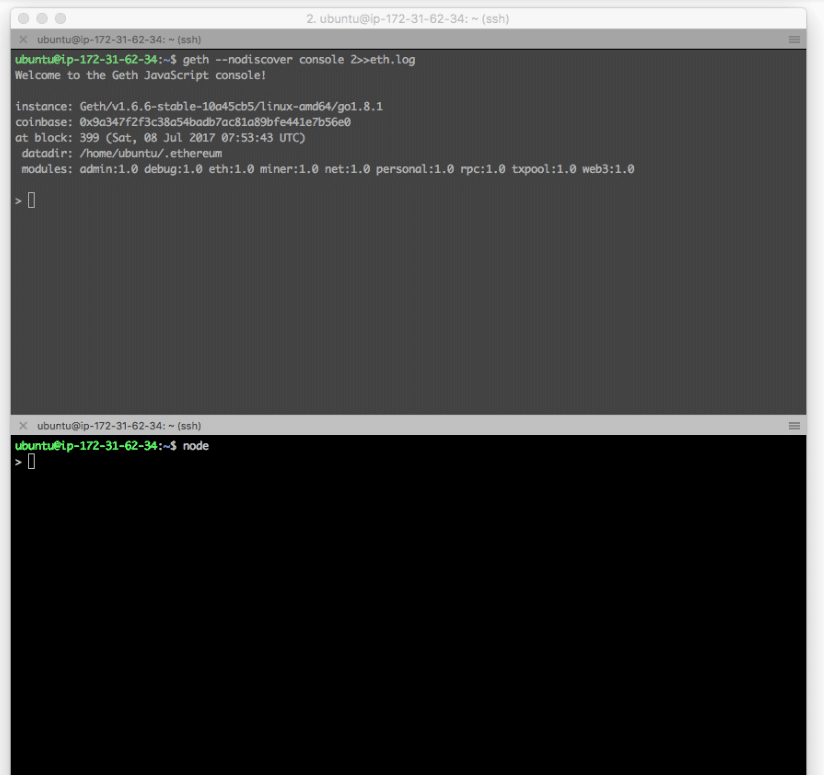
We are ready to access the node. Since we need both geth client and node console, we will use split screen again. The top terminal is geth, and the bottom is node console.

To start the geth, depending on whether you still have geth running, either command should bring you back to console.

Node 1 (geth)
$ geth --nodiscover console 2>>eth.log OR
$ geth attach

To start the node console, simply use this

Node 1 (node)
$ node
Two-Node Setup of a Private Ethereum on AWS with Contract Deployment (Part 2)

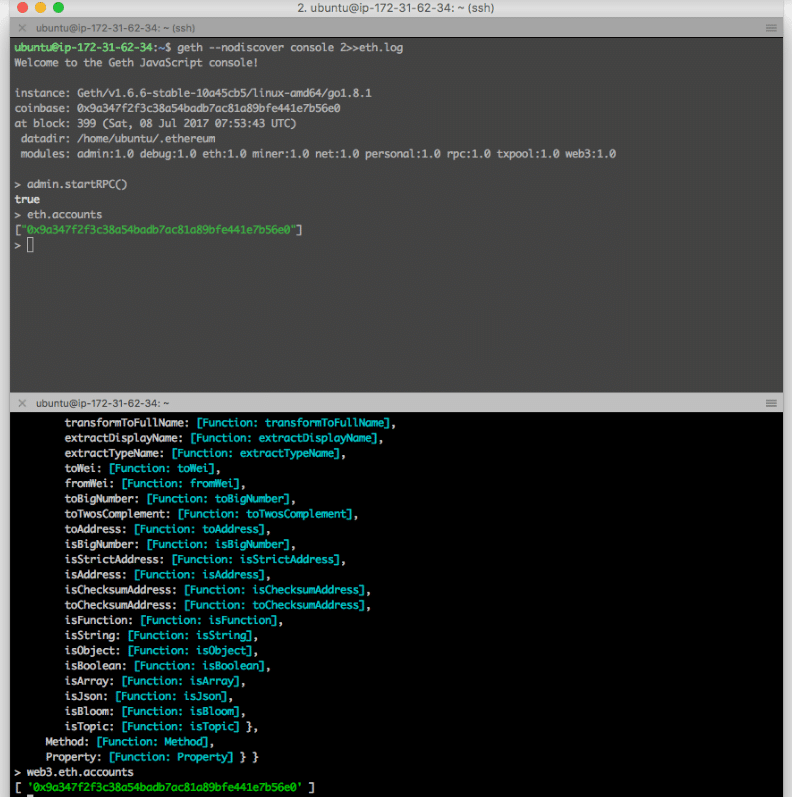
We are now ready to use node console to access geth by rpc. The default rpc is on http://localhost:8545/.
First, turn on rpc on geth:

Node 1 (geth)
> admin.startRPC()

On node console,

Node 1 (geth)
> admin.startRPC()

To verify if the node can reach geth successfully we can use > web3.eth.accounts on node console. We should see the account that we created on geth console.
Two-Node Setup of a Private Ethereum on AWS with Contract Deployment (Part 2)

Repeat this step on Node 2.

Step 3: Deploy Contract on Node 1


We now deploy the contract on this private blockchain from Node 1.

Node 1 (node)
> abi = <abi shown above>
> VotingContract = web3.eth.contract(JSON.parse(abi))
> byteCode = <bytecode shown above>

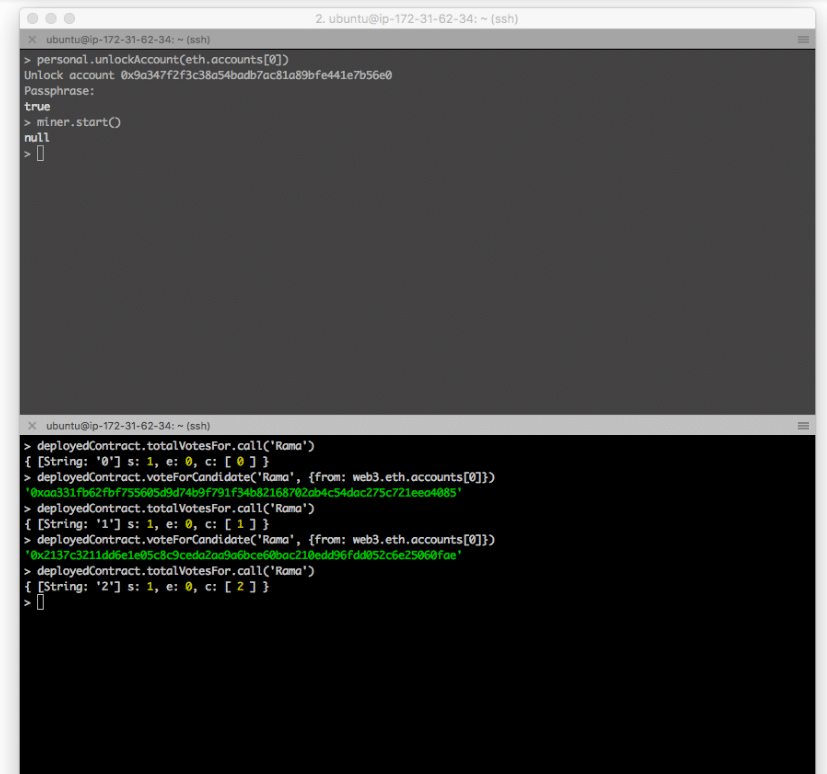
As the deployment requires gas, we need to unlock the account and turn on mining

Node 1 (geth)
> personal.unlockAccount(eth.accounts[0])
> miner.start()

Now we deploy the contract. This contract requires a list of candidates. We will include this when deploying the contract.

Node 1 (node)
> deployedContract = VotingContract.new(['Rama', 'Nick', 'Jose'], { data: byteCode, from: web3.eth.accounts[0], gas: 4700000 })

Now the contract is deployed. And we can execute the functions for verification. We will see the vote increasing when we keep executing the functions.

Node 1 (node)
> deployedContract.totalVoteFor.call('Rama')
> deployedContract.voteForCandidate('Rama', {from: web3.eth.accounts[0]})
Two-Node Setup of a Private Ethereum on AWS with Contract Deployment (Part 2)


The contract is successfully deployed. Now we move to Node 2 and see how account in Node 2 can also access this contract.

Step 4: Access Contract from Node 2


Make sure Node 1 and Node 2 have already peered. Verify by > admin.peers on geth console on both nodes. Refer to Part 1 how to do if needed.

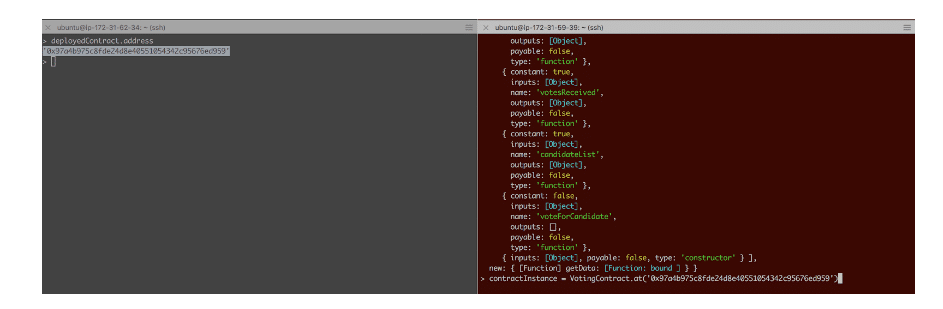
The information required for an account in Node 2 accessing this deployed contract is (1) the ABI and (2) its deployed address. We have ABI information already. Now from Node 1 we can obtain this deployed address.

Node 1 (node)
> deployedContract.address
'0x97a4b975c8fde24d8e40551054342c95676ed959'
0]})

For ABI, we define VotingContract with the same abi on Node 2.

Node 2 (node)
> abi = <abi shown above>
> VotingContract = web3.eth.contract(JSON.parse(abi))

We do not need to deploy a new contract as we did on Node 1. Instead, we define the contract instance based on the VotingContract and the address we obtained from Node 1.

Node 2 (node)
> contractInstance = VotingContract.at('0x97a4b975c8fde24d8e40551054342c95676ed959')

Left-hand-side is Node 1, and right-hand-side is Node 2.
Two-Node Setup of a Private Ethereum on AWS with Contract Deployment (Part 2)
Now, contract Instance is the point we can access this deployed contract in Node 2. We can issue the commands just as we do on Node 1:

Node 2 (node)
> contractInstance.totalVoteFor.call('Rama')
> contractInstance.voteForCandidate('Rama', {from: web3.eth.accounts[0]})
)

Don’t forget to unlock the account on Node 2 when voting, as this consumes gas to execute a function on the contract.

Step 5: Verification


By interacting on both nodes, we see accounts on both nodes are acting on the same contract. Here I capture the interaction between the two nodes.

  1. Both nodes see the same result (vote count for Rama is 4).
  2. An account on Node 1 votes for Rama once.
  3. From Node 2 we see the vote count for Rama is now 5.
  4. An account on Node 2 votes for Rama again.
  5. From Node 1 now we see the vote count is now 6.

Closing


This setup emulates the real Ethereum operation. New nodes can easily join the public chain and can access deployed contract. Of course, in real life, the application is most likely accessed through web interface. Nevertheless, using console helps understanding more the interaction behind.

Once again, thanks for many works by others which inspire and guide my overall setup. Here they are,

  • JJ’s World: Setting up a private Ethereum blockchain (link)
  • Mahesh Murthy: Ethereum for Web Developers (link)
  • MLG Blockchain Consulting: Use Go-Ethereum to Setup an Ethereum Blockchain on AWS (link)

Saturday, February 24, 2018

Install Singularity on HPC

Problem 
When I was trying to install Singularity on my HPC system, I got some errors similar to the following: 
P4n73r @ tmux:git:(master) sh autogen.sh
Useless use of /d modifier in transliteration operator at /usr/local/share/automake-1.9/Automake/Wrap.pm line 60.
configure.ac: installing `etc/install-sh'
configure.ac: installing `etc/missing'
configure.ac:8: installing `etc/config.guess'
configure.ac:8: installing `etc/config.sub'
Makefile.am: installing `etc/compile'
Makefile.am: installing `etc/depcomp'
configure.ac:109: error: possibly undefined macro: AC_SEARCH_LIBS
      If this token and others are legitimate, please use m4_pattern_allow.
      See the Autoconf documentation.
autoreconf: /usr/local/bin/autoconf failed with exit status: 1
autoreconf failed

Solution
Had the same issue on OS X that the OP reported in the first traceback. Needed the following to build it correctly. Then everything went smoothly.
  • autoconf
  • automake
  • m4
  • libtool
  • libevent
  • perl
  • pkg-config
 

Tuesday, January 9, 2018

30 Cool Open Source Software Tools I Have Discovered

30 Cool Open Source Software I Discovered in 2013

Posted on
These are full-featured open source software products, free as in beer and speech that I started to use recently. Vivek Gite picks his best open source software of 2013.

#1 Replicant – Fully free Android distribution

Replicant is entirely free and open source distributions of Android on several devices including both phones and tablets. I have installed it on an older Nexus S. You can install apps from F-Droid store a GPLv2 client app that comes configured with a repository hosting only free as in freedom applications.
Replicant an free and open source andriod os
Operating system : Linux/Android
Purpose : Free os for phone/tablets
Targets : User who wish to have a full control over the mobile phone with strong privacy settings
License : Apache License 2.0/GPL 2.0
Download url : replicant.us

#2: Miro video converter

This is an open source, cross-platform application to convert videos from and to various formats, including formats suitable for devices such as Android/iOS phones. It is simple and easy to use software to convert almost any video to MP4, WebM (vp8), Ogg Theora format. Miro Video Converter is based on FFMPEG and act as a front end to FFMPEG command line tools.
Miro video converter - Cool FOSS Software of 2013 - nixCraft
Operating system : Cross-platform
Purpose : Video converter
Targets : Multimedia users
License : GPL
Download url : mirovideoconverter.com

#3 OwnCloud – Dropbox alternative for cloud storage service

I was looking for an alternative to Dropbox to run cloud on my own server at home and office. This software is open source software, and it is self hosted. I don’t have to trust third party with my data. I found this software easy to install and quite useful. I started to use it for syncing files and other data. I have been using for couple of months and it has been proven reliable alternative to Dropbox. There are clients available for MS-Windows, OS X, Linux, and mobile apps for iOS and Android devices (or simply access data using the ownCloud web frontend).
OwnCloud - Cool FOSS Software of 2013 - nixCraft
Operating system : Cross-platform
Purpose : Cloud storage (Data synchronization)
Targets : Home users/IT departments/Sysadmins
License : AGPLv3
Download url : owncloud.org

#4 Docker – FreeBSD like container+API for Linux

The FreeBSD jail provides an operating system-level virtualization partition a FreeBSD-based serve into several independent mini-systems. You can do the same with Linux using OpenVZ. Linux Containers (LXC) is a virtualization method for running multiple isolated Linux systems. Docker extends LXC. It uses LXC, cgroups, Linux kernel and other parts to automate the deployment of applications inside software containers. It comes with API to runs processes in isolation. With docker I can pack WordPress (or any other app written in Python/Ruby/Php & friends) and its dependencies in a lightweight, portable, self-sufficient container. I can deploy and test such container on any Linux based server.
Docker - Cool Software of 2013 - nixCraft
Operating system : Linux amd64
Purpose : OS level virtualization
Targets : DevOps/Sysadmins
License : Apache License 2.0
Download url : docker.io

#5 Adminer – A lightweight and full-featured database management tool

Adminer is a full-featured database management tool written in PHP. Conversely to phpMyAdmin, it consists of a single file ready to deploy to the target server. Adminer is available for MySQL, PostgreSQL, SQLite, MS SQL and Oracle. I usually install this for clients who are new to PostgreSQL/MySQL. The software acts as a drop-in-replacement for phpMyAdmin with a better user interface, better support for MySQL features, higher performance and more security.
Adminer - Cool Software - 2013
Operating system : Cross-platform
Purpose : Database management
Targets : DBA/new users
License : Apache License or GPL 2
Download url : adminer.org

#6 MariaDB – Drop-in replacement for Oracle MySQL server

MariaDB is a community-developed fork of the MySQL server. MariaDB is going to be default in many popular Linux distro and open source project. Red Hat will switch the default database in its enterprise distribution, RHEL (including its clones such as CentOS), from MySQL to MariaDB, when version 7 is released in 2014. I started testing MariaDB and found no problems at all. The speed is same or better in some cases.
Operating system : Cross-platform
Purpose : RDBMS
Targets : DevOps/Sysadmins
License : GPL/LGPL
Download url : mariadb.org

#7 RackTables – Manage your data center assets like a pro

I wish I discovered RackTables earlier. It is is a datacenter asset management system. With this software one can document hardware assets (such as server, workstations, routers, switches and more), network addresses, space in racks, networks configuration and more:
  1. List of all devices, racks, and enclosures you’ve got
  2. Mount the devices into the racks
  3. Maintain physical ports of the devices and links between them
  4. Manage IP addresses, assign them to the devices and group them into networks
  5. Document your NAT rules, describe your loadbalancing policy and store loadbalancing configuration
  6. Attach files to various objects in the system
  7. Create users, assign permissions and allow or deny any actions they can do
Racktables - Cool FOSS Software of 2013 - nixCraft
Operating system : Cross-platform
Purpose : IDC asset management system
Targets : Sysadmin/DevOPS/IT Managers
License : GPL
Download url : racktables.org

#8 Apache Cordova – Create smartphone app just with HTML, CSS, and JavaScript

Apache Cordova is a free and open source framework that allows you to create mobile apps using standardized web APIs. You can create apps that work on iOS, Andriod, BlackBerry, Windows, Ubuntu and other phone based operating systems. You write code once and run on selected mobile platforms with little or no change at all. PhoneGap uses Apache Cordova.
Operating system : iOS, Android, webOS, Symbian, BlackBerry, Ubuntu Touch, Windows Phone, Windows 8
Purpose : Build native mobile apps
Targets : Developers
License : Apache License 2.0
Download url : cordova.apache.org or phonegap.com

#9 Angry IP scanner – ipscan tool

Nmap is an open source security tool for network exploration, security scanning and auditing. ipscan (Angry IP Scanner) is an alternative to nmap command. It is also an open-source and cross-platform network scanner designed to be fast and simple to use. It scans IP addresses and ports as well as has many other features.
Angry IP Scanner (Ipscan) - Cool FOSS Software of 2013 - nixCraft
Operating system : Cross-platform
Purpose : Network scanner
Targets : Sysadmin/Network administrators
License : GPL 2
Download url : angryip.org

#10 Jekyll – Create simple static blog

Drupal, Typo3, WordPress and many other content management system (CMS)/blogging software dynamically create feature rich content. However, you may not need all the all features and complexity offered by modern CMS based systems. For example, a WordPress based blog like nixCraft requires multiple VMs, CDN for static assets, caching engine such as memcached, PHP, mysql database, comment moderation, and on going updates. A growing trend is to keep your blog simple by avoiding CMS and use static HTML generators that offers the following benefits:
  • No more complex setups i.e. no databases/php/caching engines required.
  • No more comment moderation.
  • Pesky updates.
  • Static files are more secure.
  • Easy to scale or cache on edge/CDN nodes.
  • Provides all the blog-aware visual bells and whistles such as categories, pages, posts, Permalinks, and custom layouts.
Operating system : Cross-platform
Purpose : Blogging system
Targets : Bloggers who wish to follow KISS principal.
License : MIT License
Download url : jekyllrb.com
Similar apps: Haskell based Hakyll, Ruby based nanoc, Python based Pelican.

#11 TurnKey Linux – Deploy open source apps on VM or the clouds

You can setup a open source software such as WordPress, Drupal, ZenCart, and over 100+ other software easily with TurnKey Linux. It is a virtual appliance library that integrates and polishes the very best open source software into ready to use solutions. Each virtual appliance is optimized for ease of use and can be deployed in just a few minutes on bare metal, a virtual machine and in the cloud/in physical server. TurnKey Linux is based on Debian 7.2 with automatic security updates for all packages. It also includes a web management interface, web shell, and simple configuration console. I often use this to deploy development server in the cloud.
Turnkey Linux - Cool FOSS Sofware of 2013 - nixCraft
Operating system : Linux
Purpose : Virtual appliance library
Targets : Sysadmin/Developers/DevOPS
License : Free software licenses
Download url : turnkeylinux.org

#12 DokuWiki – Create a personal wiki

DokuWiki is a simple to use and highly versatile open source wiki software that doesn’t require a database. Easy to install on Linux or Unix-like operating systems with the following features:
  1. Ease of use and low system requirements.
  2. Built-in access control lists.
  3. Customization using large variety of extensions, plugins, and templates.
I use this on my laptop to keep notes about various projects.
Operating system : Cross-platform
Purpose : Documentation
Targets : Wiki users.
License : GPL 2
Download url : dokuwiki.org

#13 MediaGoblin – An alterative to Youtube/Flickr/Soundcloud

GNU MediaGoblin is free software, decentralized media publishing platform. You can host and share videos, music, and images using MediaGoblin. It is an alternative to major media-publishing services such as Flickr, deviantArt, YouTube, Soundcloud, etc. It is written in Python and SQL.
MediaGoblin - Cool FOSS Software of 2013 - nixCraft
Operating system : Linux/OSX/MS-Windows
Purpose : Sharing many forms of digital media
Targets : Freedom respectful media sharing self-hosted service
License : AGPLv3/CC0
Download url : mediagoblin.org

#14: Scrollout F1 – Create email firewall gateway

Scrollout F1 is easy to use and setup email firewall gateway system. It includes anti-spam and anti-virus protection for Microsoft Exchange, Postfix, Exim, Sendmail, Qmail and others. It runs on Debian and Ubuntu Linux operating systems. This is perfect software for filtering incoming messages and other features are as follows:
  1. TLS/SSL encryption with Perfect Forward Secrecy for SMTP & HTTPS
  2. Virus scanning and different Quarantine per domain
  3. Tagging and blocking SPAM at domain level
  4. Geographic filtering for Sender IP, Server IP, URL IP and TLDs
  5. Verifies incoming emails for DKIM and signs outgoing emails (2048 bits RSA)
  6. Protection against fake messages that appear to come from your domain or from yourself
  7. Protection against executable files, malicious content, scripts and more
  8. Protection against forged domains like (fake) yahoo.com, gmail.com etc.
  9. Whitelist and Blacklist
  10. Simple web interface for management
Scrollout F1 Email Gateway - Cool FOSS Software of 2013 - nixCraft
Operating system : Linux
Purpose : Firewall and anti-spam gateway for MS-Windows/Linux/Unix-like email servers
Targets : Sysadmin
License : GPL
Download url : scrolloutf1.com

#15 Observium – Network observation and monitoring system

Observium is free and open source software written in PHP/MySQL. It collects data from devices using SNMP and presents it via a web interface. It includes support for a wide range of network hardware and operating systems including Cisco, Windows, Linux, HP, Dell, FreeBSD, Juniper, Brocade, Netscaler, NetApp and many more. I use this software along with Nagios to get better understanding of certain devices and technologies. It provides historical and current performance statistics, configuration visualization and syslog capture.
Observium - Cool FOSS Software of 2013 - nixCraft
Operating system : Linux/Unix-like
Purpose : Network monitoring
Targets : Sysadmin
License : Observium License
Download url : observium.org

#16 SimpleInvoices

It is a web based invoicing system. It helps me to create quick and nice looking invoices without having to set up too much services on server. All you have to do is install the SimpleInvoices software, enter a biller, a customer details and go creating invoices. You can easily track your finances; send invoices as PDF’s and more. It is the best invoicing set up for my independent IT consultancy business.
SimpleInvoices - Cool FOSS Software of 2013 - nixCraft
Operating system : Linux/Unix-like/Windows/OSX
Purpose : Invoicing system
Targets : Sole traders/Small business owners
License : Observium License
Download url : simpleinvoices.org
Similar apps : BambooInvoice – another invoicing software intended for small businesses and independent contractors

More cool apps

I sometime use and recommend the following software for MS-Windows/Linux usersdue to simplicity and ease of use features. Here is the list of the other best and FOSS apps of 2013:

#17 FileZilla – sftp/ftp client for noobs

This is a perfect open-source FTP, FTP over SSL/TLS (FTPS) and SSH File Transfer Protocol (SFTP) client for Windows, Mac OS X and GNU/Linux. It has the following features that new users might find useful:
  1. Drag & drop support
  2. Tabbed user interface
  3. File transfer queue and bookmarks
  4. Remote file editing and remote file search
  5. SOCKS5 and FTP-Proxy support
FileZilla - Cool FOSS Software of 2013 - nixCraft
Operating system : Cross-platform
Purpose : FTP client
Download url : filezilla-project.org

#18 WinSCP – Easily transfer file using scp

It is an open source free SFTP client and FTP client for Windows. Its main function is the secure file transfer between local and server under your control. Most new MS-Windows user find WinSCP an easier to use as compare to putty and friends.
Operating system : MS-Windows
Purpose : SFTP/FTP client
Download url : winscp.net

#19 XAMPP – Easily write and test Apache+MySQL+PHP/Perl apps on desktop

I give this software to many developers. They can easily setup Apache, MySQL, PHP/Perl to deploy and write an application on their own desktop. No need to install virtual machine and Linux server. Just focus on development and skip real server management job to pros.
Operating system : Cross-platform
Purpose : Apache distribution for desktop user/developers.
Download url : apachefriends.org

#20 Abiword – A nice little word processor

Many users only use 2% of the features of a program like Microsoft Word. No need to spend money or time on Microsoft Word. I personally use Abiword due to:
  1. Easy to use and not bloated as OO.org.
  2. Small size word processor i.e. it loads very fast on my old computer.
  3. I can read and write OpenOffice.org documents, Microsoft Word documents, WordPerfect documents, Rich Text Format documents, HTML web pages and more.
  4. Abiword is tightly integrated with the AbiCollab.net web service, which lets you store documents online, allows easy document sharing with your friends, and performs format conversions on the fly.
AbiWord - Cool FOSS Software of 2013 - nixCraft
Operating system : Cross-platform
Purpose : Word processing program
Download url : abisource.com

#21 {less}: The dynamic stylesheet language

LESS extends CSS with dynamic behavior such as variables, mixins, operations and functions. LESS can run on the client-side and server-side or can be compiled into plain CSS.
LESS extends CSS with dynamic behavior  - Best of FOSS 2013 - nixCraft
Operating system : Cross-platform
Purpose : Web developers
Download url : lesscss.org

#22 Cinnamon

Cinnamon is a GTK+ based desktop environment and a fork of the GNOME Shell. It was initially developed by Linux Mint. It offers a user interface with the following features that I needed most:
  1. A movable panel equipped with a main menu, launchers, a window list and the system tray
  2. Various extensions and applets
  3. Cinnamon makes GNOME3 a useful desktop
Cinnamon - Cool FOSS Software of 2013 - nixCraft
Operating system : Linux
Purpose : Desktop user
Download url : linuxmint.com

#23 Tmux

Tmux is terminal multiplexers for Unix-like platforms. tmux offers several advantages over GNU/screen:
  1. Vi or emacs key layouts
  2. Multiple paste options
  3. Secure code base
  4. An option to limit the window size and more.
Tmux - Cool FOSS Software of 2013 - nixCraft
Operating system : Linux/Unix-like
Purpose : Terminal multiplexer
Download url : tmux.sourceforge.net

#24 Artica – Full SMTP/Mail/Proxy server Appliance in 10 minutes

It is a simple and straightforward software that offers the following features:
  1. Proxy server Appliance
  2. SMTP server Appliances
  3. Mail server Appliances
  4. NAS server Appliance
  5. Web based management
Artica Proxy/SMTP server Appliance - Cool Software of 2013 - nixCraft
Operating system : Linux
Purpose : Turn normal server into appliances
Download url : artica.fr

#25 Zentyal small business server

Zentyal is a full-featured Linux server for small and medium businesses that you can set up in less than 30 minutes. It is a drop-in replacement for Microsoft Small Business Server and Microsoft Exchange Server. It is easy to use software. Zentyal is based on Ubuntu and it can be installed either from Ubuntu repositories or from Zentyal’s own installer.
Zentyal - Cool FOSS Software of 2013 - nixCraft
Operating system : Linux
Purpose : Office server
Download url : zentyal.org

#26 Ack-grep – a source code search tool for programmers

ack-grep is a grep like tool, optimized for programmers. This tool isn’t aimed to “search all text files”. It is specifically created to search source code trees, not trees of text files. It searches entire trees by default while ignoring Subversion, Git and other VCS directories and other files that aren’t your source code.
Operating system : Cross-platform
Purpose : Search source trees
Download url : beyondgrep.com

#27 ditaa – DIagrams Through Ascii Art

ditaa is a small command-line utility, that can convert diagrams drawn using ascii art, into proper bitmap graphics. I use this tool all the time to draw diagrams and forwardingthem via email or chat session.
ditaa - Cool FOSS Software of 2013 - nixCraft
Operating system : Cross-platform
Purpose : Convert diagrams drawn using ascii art
Download url : ditaa.sourceforge.net

#28 GNU parallel

GNU parallel is a shell tool for executing jobs in parallel using one or more computers. If you like xargs command, try GNU/parallel utility. It can run command/script/job on all available CPU’s or on multiple computers.
Gnu/parallel - Cool FOSS Software of 2013 - nixCraft
Operating system : Cross-platform (Perl)
Purpose : Execute shell scripts/jobs in parallel
Download url : gnu.org

#29 luckyBackup data back-up and synchronization tool

luckyBackup is an application for data back-up and synchronization powered by the rsync tool. It is simple to use, fast, safe, reliable and fully customizable backup software. I often set and recommend this too for new Ubuntu/Fedora desktop users to backup their own files.
Lucky Backup - Cool FOSS Software Of 2013 - nixCraft
Operating system : Linux/Unix-like
Purpose : Desktop backup
Download url : luckybackup.sourceforge.net

#30 OpenShot video editor

OpenShot Video Editor is a free and open-source non-linear video editing software package for Linux. I use this tool to create videos for my youtube channel. It is a stable, free, and friendly to use video editor on Linux.
Openshot - Cool Opensource Software of 2013 - nixCraft
Operating system : Linux
Purpose : Video editing
Download url : openshot.org

Conclusion

This is my personal FOSS software list and it is not absolutely definitive, so if you’ve got your own software, share in the comments below. Also don’t forget to check out our previous years 15 greatest open source terminal applications of 2012.
[ Happy New Year to all nixCraft visitors. I hope that 2014 proves to be just as awesome for Linux & FOSS enthusiast everywhere. ]

Posted by: Vivek Gite