
Thursday, January 28, 2016

Monday, January 25, 2016
Install QEMU on ubuntu 14.10 and mange QEMU with Virt Manager
QEMU is a generic and open source machine emulator and virtualizer.When
used as a machine emulator, QEMU can run OSes and programs made for one
machine (e.g. an ARM board) on a different machine (e.g. your own PC).
By using dynamic translation, it achieves very good performance.
When used as a virtualizer, QEMU achieves near native performances by executing the guest code directly on the host CPU. QEMU supports virtualization when executing under the Xen hypervisor or using the KVM kernel module in Linux. When using KVM, QEMU can virtualize x86, server and embedded PowerPC, and S390 guests.
The virt-manager application is a desktop
user interface for managing virtual machines through libvirt. It
primarily targets KVM VMs, but also manages Xen and LXC (linux
containers). It presents a summary view of running domains, their live
performance & resource utilization statistics. Wizards enable the
creation of new domains, and configuration & adjustment of a
domain’s resource allocation & virtual hardware. An embedded VNC and
SPICE client viewer presents a full graphical console to the guest
domain.
Install QEMU on ubuntu 14.10
Open the terminal and run the following command
to fix this issue is restart your ubuntu PC and try to open virt-manager it will work without any issue

Using Virt-manager
You can open virt-manager from dash by searching "virtual machine manager"

Once it opens you should see similar to the following screen

You can create new virtual machine by clicking on "Name"


This will complete the new VM creation and from here you can install Guest OS on this VM.
When used as a virtualizer, QEMU achieves near native performances by executing the guest code directly on the host CPU. QEMU supports virtualization when executing under the Xen hypervisor or using the KVM kernel module in Linux. When using KVM, QEMU can virtualize x86, server
and embedded PowerPC, and S390 guests.The virt-manager application is a desktop
user interface for managing virtual machines through libvirt. It
primarily targets KVM VMs, but also manages Xen and LXC (linux
containers). It presents a summary view of running domains, their live
performance & resource utilization statistics. Wizards enable the
creation of new domains, and configuration & adjustment of a
domain’s resource allocation & virtual hardware. An embedded VNC and
SPICE client viewer presents a full graphical console to the guest
domain.Install QEMU on ubuntu 14.10
Open the terminal and run the following command
sudo apt-get install qemu-kvm qemu virt-manager virt-viewer libvirt-binAfter the installation when i try to open the virt-managet i got "Unable to connect to libvert" so simple solution
to fix this issue is restart your ubuntu PC and try to open virt-manager it will work without any issue
Using Virt-manager
You can open virt-manager from dash by searching "virtual machine manager"

Once it opens you should see similar to the following screen

You can create new virtual machine by clicking on "Name"


This will complete the new VM creation and from here you can install Guest OS on this VM.
How to burn .iso to USB drive in Linux
For Command Line Lovers
For command line lovers like me the best utility to burn a .iso to USB drive is "dd".
- Insert the USB drive and open terminal (Ctrl+Alt+T)
- better be a root (sudo -i), don't be afraid believe in yourself
- use "fdisk -l" to find the USB device
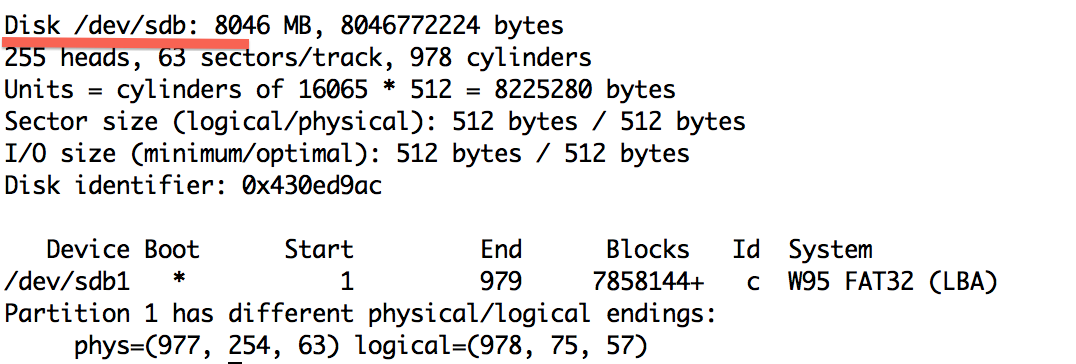
- So in our case its /dev/sdb
- Make sure the USB device is unmounted
umount /dev/sdb1
- Assuming the .iso file is in your current working folder, type the below command and wait for it to finish.
dd bs=4M if=ubuntu-12.04.2-server-i386.iso of=/dev/sdb

- ubuntu-12.04.2-server-i386.iso is your .iso file
- "bs=4M" is optional. Its just to make it faster
Testing Time....
To
test if everything has gone right, boot your system from the USB drive.
To do so you will have to reboot your system. QEMU can help you in
this. What?! Yes QEMU is a machine emulator and virtualizer.
- Make sure qemu is installed (apt-get install qemu)
- run the below command and you will see a virtual machine booting from your USB Drive
qemu -hda /dev/sdb
Evaluating OpenShift vs. Cloud Foundry for open source PaaS
OpenShift and Cloud Foundry are two popular options for open source PaaS. Here's how to tell which one is right for your development needs.
It's difficult to change open source cloud development tools after integration is complete. Developers and IT staff must be comfortable using and supporting the tool -- and ready to commit to it long term. This requires extensive research of open source tools, as well as copious evaluation testing.
Cloud development platforms accomplish similar goals, but you still need to choose the right one for your unique business and development needs. Two of the most common open sourceplatform as a service (PaaS) tools are OpenShift by Red Hat Inc., andCloud Foundry by Pivotal Software Inc. To determine which is right for you, it's important to evaluate three key characteristics of each tool: the programming languages they support, their architecture and how they integrate with third-party tools.
OpenShift vs. Cloud Foundry: language support and features
You want to choose an open source PaaS tool that will support your current and future language preferences. OpenShift uses modules -- called cartridges -- that support versions of Java, PHP, Python, Perl, Node.js and database languages for MySQL, MongoDB and PostgreSQL. In addition, OpenShift supports tools such as Jenkins and Cron, as well as services including Oracle Business Process Management Suite and Red Hat JBoss Business Rules Management System.
By comparison, Cloud Foundry supports languages in the form of buildpacks, or scripts for compiling applications for the platform. These buildpacks include Java, Node.js, Ruby, binary, Go, PHP, Python and others. Users can also choose to write their own buildpacks.
Next, consider the essential features and capabilities you need in an open source PaaS tool. Remember, there could be open source and commercial versions of each tool, as well as hosted and local variations. For example, Red Hat offers OpenShift Online, and OpenShift Enterprise, which is hosted in the user's data center. Both provide a self-service development platform, multilanguage support, automation, collaboration, container portability and support for different cloud infrastructures.
Cloud Foundry offers features for security, monitoring and management, container portability, hybrid cloud support, automatic updates, as well as service integration for databases, analytics and other middleware.
Architecture and integration also key
Open source PaaS offerings are usually composed of multiple modules or components, so IT decision-makers should review each platform's architecture. For example, Cloud Foundry includes a router, authentication server, application lifecycle manager, application execution engine, service brokers, messaging, and metrics and logging elements.
OpenShift uses a radically different architecture. It's composed of individual nodes to hold application code and services, along with a series of individual brokers to manage the nodes and provision services. In addition, OpenShift's architecture includes a messaging system to tie the nodes and brokers together, and uses RESTful APIs to integrate with outside tools.
Open source development platforms often need to integrate with other tools to offer a complete feature set. For example, Cloud Foundry integrates with the following platforms and tools:
- Diego runtime environment: this offers shared memory, workload scheduling and different container formats.
- Lattice: a Pivotal tool for running containerized workloads in a cloud cluster. Lattice provides router, health, execution, storage and logging capabilities for Cloud Foundry.
- Bosh: an open source tool for version control, deployment and lifecycle management of cloud services.
By comparison, OpenShift integrates with and relies on several tools, including RHC client tools to create, deploy and manage applications and JBoss Developer Studio to create web-based applications.
In addition to the open source tools mentioned above, organizations should also consider public cloud development tools from Amazon Web Services, Google App Engine and Microsoft Azure. But when evaluating any open source development platform, it's important to recognize the constituent tools involved -- especially if those constituent tools are third-party products.
Cloud Foundry PaaS takes big step with certification
The Cloud Foundry PaaS certification solidifies the core of the technology backed by some of the biggest IT vendors in the world.
The Cloud Foundry Foundation, the organization behind open source frameworks for building platform as a service capabilities, took a major step toward its stated goal of interoperability this week with a new certification program.
The Cloud Foundry Foundation has agreed upon an underlying standard all companies must meet to maintain the Cloud Foundryplatform as a service (PaaS) brand. This solidifies the value of the technology and ensures a certain degree of portability between different vendors' versions, industry observers said.
BNY Mellon Wealth Management, which provides technology and hosted services to Wall Street, and is a founding member of the foundation, has put Cloud Foundry PaaS at the center of many of its IT plans going forward. Wall Street remains wary of public cloud, but BNY Mellon needs to be prepared for the future, too, said Michael Gardner, managing director and head of BNY Mellon innovation.
"Eventually, that [aversion to public cloud] will change. And at that point, we need the option of recarpetability of our capacity, so we could relatively easily expand and have hybrid outside our own private cloud," Gardner said.
Vendors must be recertified every year and be up to date with the latest certification within a certain window of its release, with backward and forward compatibility.
The foundation has 55 members, including some of the biggest names in IT. The first vendors to have their PaaS offering verified are CenturyLink, Hewlett Packard Enterprise, Huawei, IBM, Pivotal, SAP and Swisscom. Six more are expected to be certified in the next couple months.
Vendor lock-in remains a concern for customers, so while Cloud Foundry vendors can still add layers to differentiate their products, this will address some of those concerns, said Stephen Hendrick, principal analyst at Enterprise Strategy Group Inc., in Milford, Mass.
"By not having differences in the core and moving in lockstep, what that ensures is there's a really high level of portability from one vendor to another," Hendrick said.
The new certification is a big deal, said John Rymer, vice president and principal analyst at Forrester Research Inc., based in Cambridge, Mass.
"We know what the Cloud Foundry brand means and what is included in there," Rymer said. "Without that, the whole proposition falls apart."
There is precedent for the importance of this move with another major open source cloud project, Rymer said. OpenStack standards took years to deliver, so there was no real definition of what the technology was and no implementations were the same.
And in order to back up that promise of interoperability and freedom of implementation, which are two of the key draws to Cloud Foundry, it's also important that the foundation took the novel approach to have certification actively monitored and kept up to date, he added.
Cloud Foundry can run on Amazon Web Services and Microsoft Azure, as well as range of on-premises infrastructures.
And while this is an important step, it shouldn't be confused with the idea that these services will soon compete with the major public cloud options, Rymer said. Forrester hears from clients interested in Cloud Foundry mostly on private infrastructure, with the exception of IBM Bluemix, so Rymer is hopeful more public cloud varieties become available in the next year or so.
"We're hoping to see more, mainly because I don't think you can succeed as a private internal option only," Rymer said.
One of the key draws of Cloud Foundry -- especially for large multinationals with geolocation concerns -- is not so much being able to jump workloads from platform to platform, but being able to use multiple platforms in concert, depending on the needs of the workload, according to Sam Ramji, Cloud Foundry Foundation CEO.
Subscribe to:
Posts (Atom)